In my spare time, I've been working on a web application that I call "ReconHQ". This closed-source application helps me keep track of companies' external-facing infrastructure, monitoring things like new subdomains, automatically crawling them, documenting used technologies, and saving them in a database. Most of the scanning is done through various open-source tools, such as Katana, which crawls websites for me and also discovers JavaScript endpoints on the target. I wanted to expand the capabilities of this tool with the same AI, so I decided to do some research on a budget.
As many of you are aware, JavaScript, especially now with all the modern-day frameworks, contains a lot of information. Often, Routes reveal (hidden) paths, variables and occasionally a developer might leave some secrets in there like a private API key. However, JavaScript is often minified, obfuscated and even chunked into multiple files, which leaves a challenge. For this project, I wanted to look into ways to analyse the JavaScript for secrets in a scalable way that also does not break the bank.
Tools VS AI
But Erik, why don't you just scan them with already existing tools like JSSluice or JS-Snitch? It's practically free, scalable and these tools have already been built so they can be implemented in just a few minutes.
True, very good point, conscious reader. I have two answers to that question. First of all, most of these tools are decent enough for what they are designed to do. Which is finding secrets based on a specific pattern, like for example, the regex of an AWS key. This also means that if the key doesn't fit this behaviour, you might miss it. Actually, let's put that to the test.
I created this sample JavaScript file and ran js-snitch
const config = {
    apiEndpoint: "https://api.bestapiendpointintheworld1.com/v1",
    timeout: 5000,
    retryCount: 3,
    // CRITICAL: This is a high-entropy string often flagged
    apiKey: "AIzaSyD-5_8gFp2aZ1m9K3rJ4d0eL6n7Q8w9x0y",
    analyticsId: "UA-12345678-9"
};

export const initClient = () => {
    console.log(`Initializing client with key: ${config.apiKey}`);
    return config;
};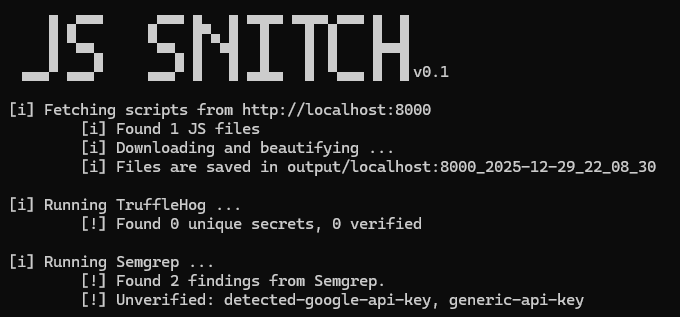
Here we can see it was actually able to spot the apiKey and the analyticsId as false positives, which is actually a good result because it was able to find the apiKey. Let's make it a bit harder
const config = {
    apiEndpoint: "https://api.bestapiendpointintheworld1.com/v1",
    timeout: 5000,
    retryCount: 3,
    // CRITICAL: This is a high-entropy string often flagged
    apiKey: "AIzaSyD-5_8gFp2aZ1m9K3rJ4d0eL6n7Q8w9x0y",
    analyticsId: "UA-12345678-9"

    // Developer Note, if the API does not work true this user token
    bearerToken: [10, 20, "eyJhbGciOiJIUzI1NiIsInR5cCI6IkpXVCJ9", 40]

};

export const initClient = () => {
    console.log(`Initializing client with key: ${config.apiKey}`);
    return config;
};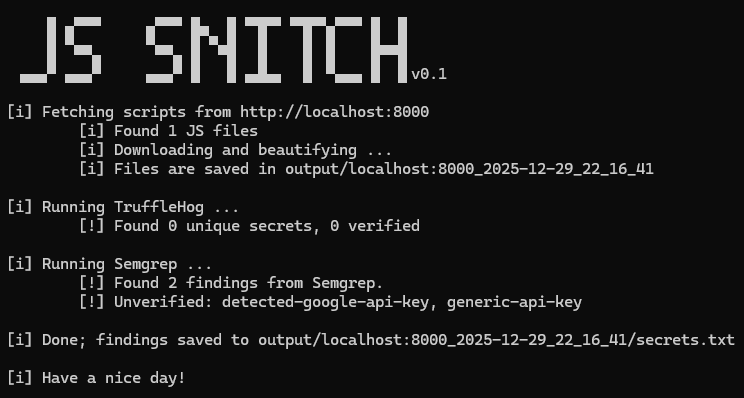
In this case, the test still shows 2 findings and the bearer token can go unnoticed; however, would AI spot it?
Gemini, you are a professional cyber securit researcher specialised in web application security. Your task is to analyse the following JavaScript and tell me all the secrets,api_keys and potential passwords.

The JavaScript to analyse is:

const config = {
    apiEndpoint: "https://api.bestapiendpointintheworld1.com/v1",
    timeout: 5000,
    retryCount: 3,
    // CRITICAL: This is a high-entropy string often flagged
    apiKey: "AIzaSyD-5_8gFp2aZ1m9K3rJ4d0eL6n7Q8w9x0y",
    analyticsId: "UA-12345678-9"

    // if the API does not work use this token
    bearerToken: [10, 20, "eyJhbGciOiJIUzI1NiIsInR5cCI6IkpXVCJ9", 40]


};

export const initClient = () => {
    console.log(`Initializing client with key: ${config.apiKey}`);
    return config;
};
Gemini replied with:
### 1. API Key

- **Variable:** `config.apiKey`

- **Value:** `AIzaSyD-5_8gFp2aZ1m9K3rJ4d0eL6n7Q8w9x0y`

- **Analysis:** This string follows the format of a **Google API Key** (starts with `AIza`). It is categorized as a high-entropy secret. Hardcoding this in client-side JavaScript exposes it to anyone who views the source code, potentially allowing them to consume your API quota or access restricted Google Cloud services.


### 2. Partial JWT (Bearer Token)

- **Variable:** `config.bearerToken` (specifically the 3rd element in the array)

- **Value:** `"eyJhbGciOiJIUzI1NiIsInR5cCI6IkpXVCJ9"`

- **Analysis:** This is a Base64-encoded string. When decoded, it translates to: `{"alg":"HS256","typ":"JWT"}`.

    - This represents the **Header** of a JSON Web Token (JWT).

    - While this specific string is just metadata (telling the server the token is a JWT signed with HS256), its presence in a variable named `bearerToken` suggests that valid authentication tokens might be improperly handled or hardcoded in this array structure in a real scenario.


### 3. Analytics ID (Low Sensitivity)

- **Variable:** `config.analyticsId`

- **Value:** `UA-12345678-9`

- **Analysis:** This is a **Google Analytics Universal Analytics ID**. While generally considered public information (as it is sent in network requests by the browser), it is still a unique identifier for the project and should be audited to ensure it matches the intended environment.
Gemini was able to spot the JWT token if in a strange format and not being used in the code. Now turning back to the question of why not use existing tools. The answer is, we don't have to pick. We can simply use tools and additionally have AI check the code for a second layer of confirmation.
Implementing AI into reconHQ
So after crawling a web application I added the functionality to analyse files using AI Agents. These agents can be configured for various purposes.
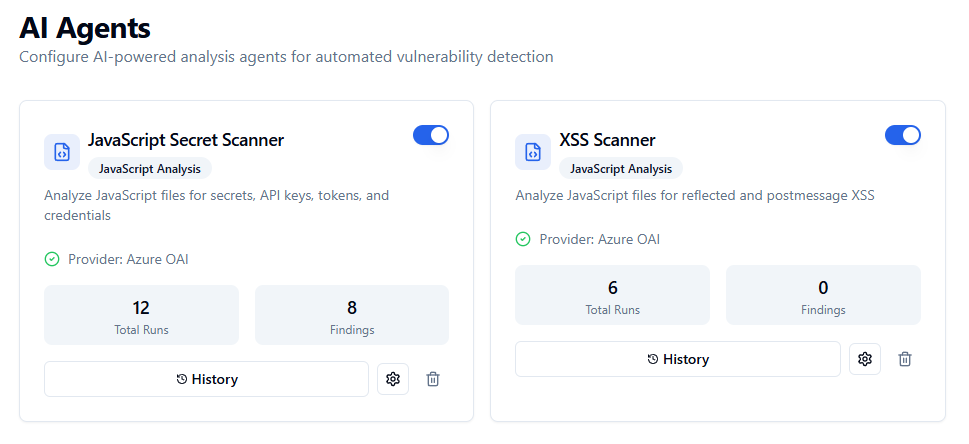
Here, I made placeholders to query different parts of the database to craft a better prompt, which is very basic but helps a lot: {filename} {url}, {javascript_content}.
System Prompt:
You are a security analyst specializing in identifying secrets, API keys, and credentials in JavaScript code. Your task is to find any hardcoded secrets, tokens, API keys, passwords, or sensitive configuration values.

Always respond with valid JSON in the following format:
{
  "findings": [
    {
      "type": "secret_type",
      "severity": "critical|high|medium|low|info",
      "value_preview": "first 10-15 characters...",
      "context": "surrounding code or variable name",
      "description": "explanation of what this secret is and why it's concerning, end with the {url} of the JavaScript"
    }
  ],
  "summary": "brief summary of findings"
}

If no secrets are found, respond with: {"findings": [], "summary": "No secrets found"}
By instructing the AI to output in a json-format the output becomes consistent and can be easily processed by my tool and placed inside the database as a finding.
User Prompt Template:
Analyze the following JavaScript code for secrets, API keys, tokens, credentials, and any other sensitive data that should not be exposed in client-side code.

**File:** {filename}
**URL:** {url}

**JavaScript Content:**
'''
{javascript_content}
'''

Identify and report any:
- API keys (Google, AWS, Azure, Stripe, etc.)
- Access tokens and bearer tokens
- OAuth client secrets
- Database connection strings
- Private keys or certificates
- Hardcoded passwords
- Internal URLs or endpoints that reveal architecture
- Debug/development configuration
As JavaScript in production environments can often be huge, I added a small system that can chunk the JavaScript and feed the chunks to the AI model with some slight overlap. This approach worked pretty well and after running some tests, I was actually able to discover some secrets.
The money problem
One thing that I noticed pretty quickly is that using GPT-4o actually can become rather expensive before you know it. Large production environments often have huge JavaScript files that need to be chunked multiple times, filling the whole context window. This often meant that scanning a single website just for secrets could easily cost a few dollars. Not a huge cost, but scanning hundreds of websites at scale using this method will become expensive. Especially since I enjoy keeping my eye on Responsible Disclosure programs in the Netherlands, which often do not pay any money (I think I can wear a fresh 'I hacked a Dutch government and all I got was this lousy t-shirt' t-shirt for every day of the week).
After some brainstorming, I came to the following potential solutions:
- Use a cheaper model for the analysis
- Use a cheaper model to determine the likelihood of secrets and only hand over to an expensive model for analysis above certain thresholds
- Try to filter out known JavaScript libraries to reduce
Honestly, the cheaper AI model would be the easiest to implement if it worked out so I decided to do some experimenting.
Let's first take a quick look at the cost of different models:
Model - Input pricing - Output pricing
ChatGPT gpt-4o $2.50 - $10.00
ChatGPT gpt-5.2 $1.75 - $14.00
ChatGPT gpt-5-nano $0.05 - $0.40
ChatGPT gpt-4o-mini $0.15 - $0.60
Google Gemini 3 pro preview $2.00 - $12.00
Google Gemini 3 flash preview $0.50 - $3.00
Claude Opus 4.5 $5 - $25
Claude Sonnet 4.5 $3 - $15
Claude Haiku 4.5 $1 - $5
xAI Grok 4.1 Fast $0.40 - $1
DeepSeek V3.2 $0.224 - $0.32
Z-AI GLM 4.7 $0.40 - $1.50
Note: It's good to know that many large API providers allow for batch processing. Here you can push large volumes for often a reduced, price, often 50% off
Obviously, smaller models are much cheaper and so are models that are open-source. However, in the case of finding secrets, we want to ensure the true positive rate is as high as possible and not miss a potential secret.
I decided to benchmark some of the models and run some tests to discover the performance, primarily focused on effectiveness to discover secrets and cost. To do this ,I set up an account with Openrouter, funded it with some money and gave all the above models the same, easy, prompt.
The prompt:
You are a security analyst specializing in identifying secrets, API keys, and credentials in JavaScript code. Your task is to find any hardcoded secrets, tokens, API keys, passwords, or sensitive configuration values.

Always respond with valid JSON in the following format:
{
  "findings": [
    {
      "type": "secret_type",
      "severity": "critical|high|medium|low|info",
      "value_preview": "first 10-15 characters...",
      "context": "surrounding code or variable name",
      "description": "explanation of what this secret is and why it's concerning, end with the https://erikvanoosbree.nl/api-config.js of the JavaScript"
    }
  ],
  "summary": "brief summary of findings"
}

Analyze the following JavaScript code for secrets, API keys, tokens, credentials, and any other sensitive data that should not be exposed in client-side code.
File: api-config.js
URL: https://erikvanoosbree.nl/api-config.js

JavaScript Content:
const config = {
    apiEndpoint: "https://api.bestapiendpointintheworld1.com/v1",
    timeout: 5000,
    retryCount: 3,
    // CRITICAL: This is a high-entropy string often flagged
    apiKey: "AIzaSyD-5_8gFp2aZ1m9K3rJ4d0eL6n7Q8w9x0y",
    analyticsId: "UA-12345678-9"

    // if the API does not work use this token
    bearerToken: [10, 20, "eyJhbGciOiJIUzI1NiIsInR5cCI6IkpXVCJ9", 40]

};

export const initClient = () => {
    console.log('Initializing client with key: ${config.apiKey}');
    return config;
};


Identify and report any:
- API keys (Google, AWS, Azure, Stripe, etc.)
- Access tokens and bearer tokens
- OAuth client secrets
- Database connection strings
- Private keys or certificates
- Hardcoded passwords
- Internal URLs or endpoints that reveal architecture
- Debug/development configuration
The results
ChatGPT gpt-4o $2.50 - $10.00
Google API Key: Critical
Bearer Token (JWT): Critical
Internal API Endpoint: Medium (reported on the v1 endpoint)
Google Analytics Tracking ID: low
ChatGPT gpt-5.2 $1.75 - $14.00
api_key_google_like: High
jwt_bearer_token: Critical
analytics_tracking_id: Low
internal_api_endpoint: Info
debug_logging_sensitive: Medium
ChatGPT gpt-5-nano (reasoning) $0.05 - $0.40
api_key: High
bearer_token: High
analytics_id: Low
endpoint: Info
ChatGPT gpt-4o-mini $0.15 - $0.60
API key: Critical
Bearer token: High
Google Gemini 3 pro preview $2.00 - $12.00
Google API Key: Critical
JWT (JSON Web Token): High
Internal API Endpoint: Info
Google Analytics ID: Low
Google Gemini 3 flash preview $0.50 - $3.00
Google Cloud API Key: High
JWT / Bearer Token: Critical
Google Analytics ID: info
Claude Opus 4.5 $5 - $25
Google API Key: Critical
JWT Bearer Token: High
Google Analytics ID: low
Internal API Endpoint: Info
Claude Sonnet 4.5 $3 - $15
google_api_key: critical
jwt_bearer_token: critical
google_analytics_id: low
internal_api_endpoint: medium
debug_logging: low
Claude Haiku 4.5 $1 - $5
API_KEY: critical
BEARER_TOKEN: critical
ANALYTICS_ID: Medium
INTERNAL_API_ENDPOINT: Medium
CREDENTIAL_IN_LOG_STATEMENT: High
xAI Grok 4.1 Fast $0.40 - $1
google_api_key: Critical
bearer_token: High
google_analytics_id: Medium
DeepSeek V3.2 $0.224 - $0.32
API Key: critical
Bearer Token: high
Tracking ID: medium
Internal Endpoint: Info
Z-AI GLM 4.7 $0.40 - $1.50
Google API Key: critical
JWT Bearer Token: critical
Sensitive Logging: high
API Endpoint: medium
Google Analytics ID: low
From this test, we can conclude that almost all models perform similarly to each other. In this case, the cheapest model ChatGPT gpt-5-nano was able to find all secrets. Four models ( ChatGPT gpt-5.2, Claude Sonnet, Claude Haiku, Z-AI) reported an additional finding and mentioned the dangerous logging function inside the code.
It seems that our tiny JavaScript snippet didn't really stand a chance as even the cheapest model was able to figure out what the secrets inside it were. Of course, in the real world, JavaScript is much bigger and might require more thinking power from the models to really provide good findings. To test that, I decided to run the same experiment again, but with a slightly different JavaScript code to analyse. (This is definitely not because I just loaded 10 dollars onto my Openrouter account, while the previous tests only cost 10 cents total) .
With the help of AI, I generated a much larger, minified JavaScript file that contained several secrets, which I used for my second test run:
/*! For license information please see main.4f2a8c91.js.LICENSE.txt */
(()=>{"use strict";var __webpack_modules__={7291:(e,t,n)=>{n.d(t,{Z:()=>u});var r=n(5043),i=n(579);const o=["title","titleId"];function a(){return a=Object.assign?Object.assign.bind():function(e){for(var t=1;t<arguments.length;t++){var n=arguments[t];for(var r in n)({}).hasOwnProperty.call(n,r)&&(e[r]=n[r])}return e},a.apply(null,arguments)}const u=r.forwardRef(function(e,t){let{title:n,titleId:s}=e;return r.createElement("svg",a({width:24,height:24,viewBox:"0 0 24 24",fill:"none",xmlns:"http://www.w3.org/2000/svg",ref:t},s),n?r.createElement("title",{id:s},n):null)})},3847:(e,t,n)=>{n.d(t,{A:()=>c,b:()=>l});var r=n(9722);const i=r.A.create({baseURL:"https://api.example-app.test/v3/"}),o="session-token-key",a=(e,t)=>{let{dispatch:n,getState:r}=e;t.interceptors.request.use(e=>{e.headers["X-Request-ID"]=crypto.randomUUID();let t=window.localStorage.getItem(o)&&JSON.parse(window.localStorage.getItem(o));return t?.accessToken&&(e.headers.Authorization="Bearer ".concat(t.accessToken)),e},e=>Promise.reject(e.response)),t.interceptors.response.use(e=>e,e=>Promise.reject(e))};const s={apiKey:"ak_live_51Hx7KLMnOpQrStUvWxYz2Ab3Cd4Ef5Gh6Ij7Kl8Mn9Op0Qr",region:"us-west-2"},l=(e,t)=>{a(e,t)},c=i},9182:(e,t,n)=>{n.d(t,{A:()=>h});var r=n(5043),i=n(4117),o=n(579);const a=n.p+"static/media/logo.8c4f2e1a.svg",s=n.p+"static/media/logo-small.2d8f4a91.svg";var l=n(2110),c=n(6494),u=n(5601);const d=e=>{const{t:t}=(0,i.Bd)();return(0,o.jsx)("div",{className:"componentWrapper ".concat(e.fullScreen?"fullHeight":"halfHeight"),id:"componentWrapper",children:(0,o.jsx)(l.A,{className:"componentCard",children:(0,o.jsxs)(c.A,{className:"componentCardContent",children:[(0,o.jsx)("div",

See the full file at: https://raw.githubusercontent.com/erik921/Blogpost-Support/refs/heads/main/Using-AI-to-find-secrets-on-a-budget/scan-results-2/JavaScript-testfile
The 4 Hidden Secrets:
- API Key :
ak_live_51Hx7KLMnOpQrStUvWxYz2Ab3Cd4Ef5Gh6Ij7Kl8Mn9Op0Qr - Stripe Publishable Key :
pk_live_51Hx7KLMnOpQrStUvWxYz2Ab3Cd4Ef5Gh6Ij7Kl - Firebase API Key :
AIzaSyDOCAbC123dEf456GhI789jKl012-MnsOp3 - Algolia Search API Key :
alg_prod_Kx9mN2pL4qR8sT6vW1yZ3Ab4Cd5Ef6Gh7Ij8Kl
I used the exact same system prompt and switched out the JavaScript for the new one.

*All models received the exact same prompt. The token in can be different based on how models calculate tokens. The amount of tokens being much larger for reasoning models is due to the reasoning taking up a lot of tokens before the final answer is given.
Based on these results, DeepSeek V3.2 came out as the winner based on a price/performance ratio. It was able to discover all the secrets and also mention the endpoints.
Putting it to the test
Based on the tests I decided to incorporate DeepSeek V3.2 into reconHQ and setup an agent with the exact same prompt mentioned earlier in this post and scan a Bug Bounty Program.
To do this I first ran various subdomain discovery scripts to discover subdomains which I than crawled using Katana, giving me 4478 JavaScript files to scan.

*Reachable means the JavaScript is valid and is also hosted on the target domain itself.
To test if my code was running successfully, I decided to first run it on a specifically JavaScript file. This file was huge and had to be chunked into 22 different pieces.
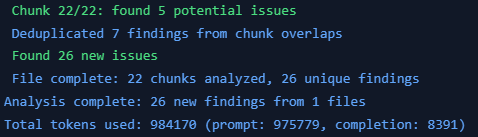
In total, it found 26 findings. 1 critical, 1 high, 6 medium, 11 low and 6 info. Looking at the findings, I can assure you that in reality, things weren't as bad as the AI made it believe. The whole scan had a cost of $0.27.
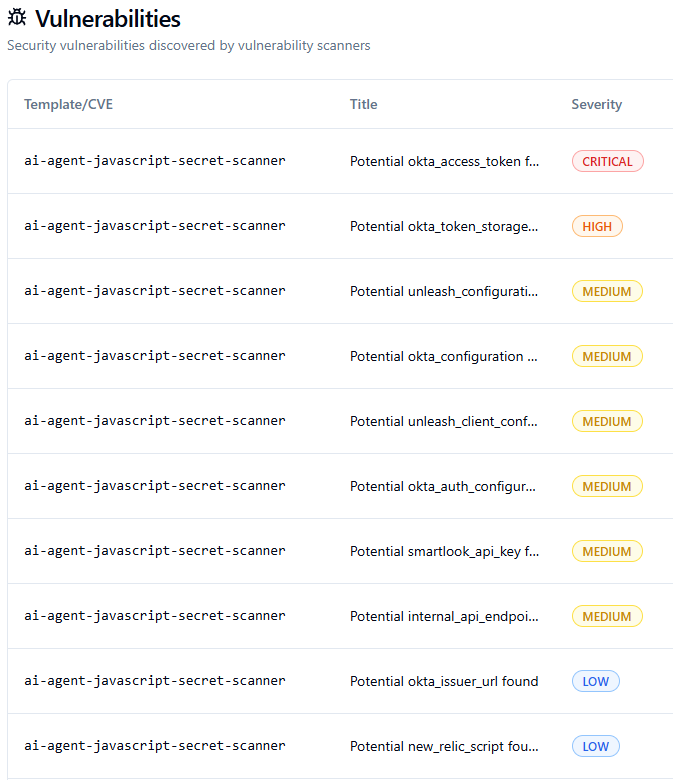
First of all, the critical vulnerability "Potential okta_access_token found" did in fact not find an okta_access_token. The description of the AI mentions: "The code appears to be accessing Okta access tokens from localStorage and using them for API authorization. While not hardcoded, this pattern exposes authentication tokens in client-side code which could be intercepted via XSS attacks. The token is retrieved from the localStorage item 'okta-token-storage' and used to set the Authorization headers."
A similar pattern repeats itself across the other findings. Notice also how every title contains "Potential".
Back to the drawing board
I believe DeepSeek V3.2 is smart enough to properly classify the severity of its findings; however, we left it too much freedom. Similar patterns arise with humans. If you would give someone a pen without saying anything, they would often freeze up, not knowing what to do. However, when we would give someone a pen and tell them to draw a flower, they go right ahead.
Here, it could be a good approach to set up a multi-stage AI system. One to discover the findings and an additional system to look at those findings and provide an accurate severity. In my case, I just decided to modify the System prompt and provided it with a lot of guidance on how to rate the severity itself.
You are a security analyst specializing in identifying secrets, API keys, and credentials in JavaScript code. Your task is to find any hardcoded secrets, tokens, API keys, passwords, or sensitive configuration values.

## Severity Classification Guidelines

Base severity on ACTUAL RISK to an organization, not theoretical concerns:

### CRITICAL
- Private API keys with write/admin access (AWS Secret Keys, private RSA/SSH keys)
- Database connection strings with credentials
- OAuth client secrets
- JWT signing secrets
- Encryption keys (AES, private keys)
- Admin passwords or master credentials
- Service account credentials

### HIGH
- API keys with read access to sensitive data
- Bearer tokens / Access tokens
- Session secrets
- SMTP credentials
- Payment processor secret keys (Stripe secret key, etc.)
- Cloud provider credentials

### MEDIUM
- API keys with limited scope but still private
- Internal service tokens
- Webhook secrets
- Keys that COULD be public but context suggests private use

### LOW
- Publishable/public API keys (Stripe publishable key, Google Maps API key, Firebase public config)
- Client-side analytics IDs (Google Analytics, Segment write keys designed for client use)
- Internal/development endpoint URLs
- Feature flags or non-sensitive configuration
- Public OAuth client IDs (not secrets)

### INFO
- Potential hardcoded values that may or may not be secrets
- Code patterns that COULD lead to secret exposure but no actual secret present
- Placeholder or example values (e.g., "YOUR_API_KEY_HERE", "xxx", "test123")
- Comments mentioning secrets without exposing them
- Development/localhost URLs
- Non-sensitive environment variable references
- Google Maps API Keys
- Google Analytics or Tracking Codes

## Classification Rules

1. **When uncertain if a key is public or private**: Check the key prefix/format:
   - `sk_live_`, `sk_test_` = SECRET (High/Critical)
   - `pk_live_`, `pk_test_` = PUBLIC (Low)
   - `AKIA` prefix = AWS Access Key (needs secret key to be dangerous alone - Medium)

2. **Context matters**: A Google Maps API key is LOW if used client-side as intended, but could be MEDIUM if it has billing implications and no domain restrictions.

3. **Don't inflate severity** for:
   - Keys explicitly designed for client-side/public use
   - Internal URLs without credentials
   - Configuration values that aren't secrets
   - Theoretical vulnerabilities without actual exposed secrets

4. **value_preview**: Show only first 10-15 characters followed by "..." - never expose full secrets

Always respond with valid JSON in the following format:
{
  "findings": [
    {
      "type": "secret_type",
      "severity": "critical|high|medium|low|info",
      "value_preview": "first 10-15 characters...",
      "context": "surrounding code or variable name",
      "description": "explanation of what this secret is, the actual risk it poses, and why this severity was assigned. End with the {url} of the JavaScript",
      "risk_rationale": "brief explanation of why this severity level was chosen"
    }
  ],
  "summary": "brief summary with count by severity: X critical, X high, X medium, X low, X info"
}

If no secrets are found, respond with: {"findings": [], "summary": "No secrets found"}
After making these changes, removing all the previous findings, and running the scan again, it returned much better classified findings.
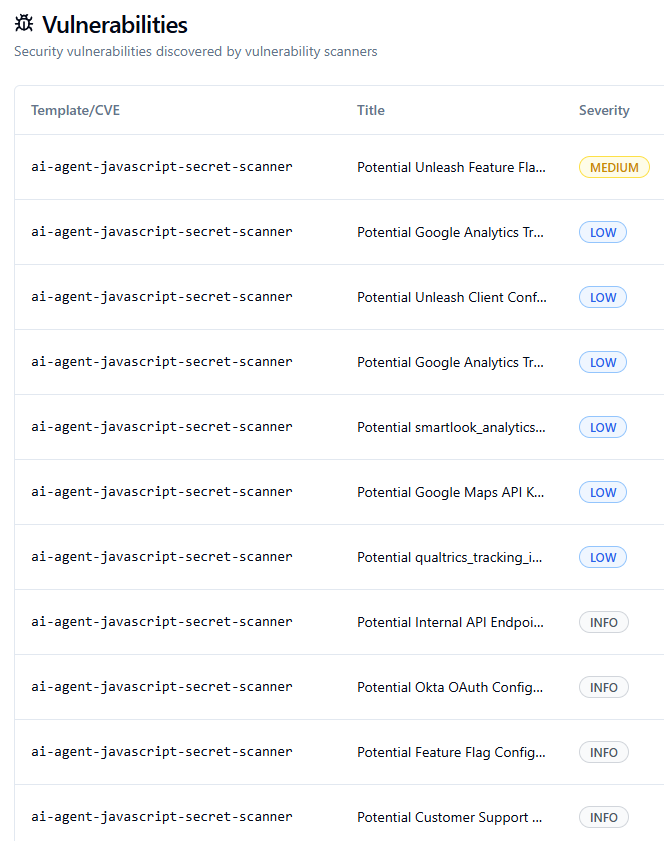
The medium finding reveals a key that could potentially be misconfigured, so I like that it gave it a slightly higher severity. The others are more regarding Google API keys and Analytics tokens, which I don't mind reporting on as I can manually check them and reduce the severity to info if I need to.
Scaling up
So now that we verified our AI agent works and makes (somewhat) logical considerations regarding severity, it's time to scale things up.
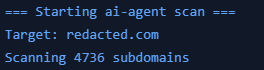
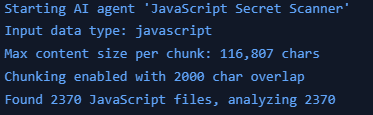
I ran my secrets finding agent on a total of 4736 pre-crawled (unauthenticated) subdomains. This means that in total, I had to scan 2370 JavaScript files. Since I didn't introduce any multithreading, it actually took a decent time to complete. The total cost of this scan was around $25
The biggest file needed to be chunked 146 times. That meant that just this file alone would be around 2-3 dollars to fully scan for secrets. Smaller files often just cost a few cents.
Results
In total we were able to scan 4736 subdomains containing 2370 unique JavaScript files with a budget of just $25. This resulted in a total of 499 findings, 31 of them being medium, 73 low and 395 informative.
Sadly, I'm not writing this from a private plane just yet. Most of the findings were actually duplicates within the same file, or the AI got a bit overzealous with 'potential' issues. For example, it flagged variables named api_key as vulnerabilities even though the actual key wasn't hardcoded.
However, that specific case might still be worth looking into. The data does get passed around, so there is a risk, it’s just not the 'Medium' severity finding the AI thinks it is.
That said, the tool was actually able to find an API key for a specific service used by the organization I ran the scan on. I reported this finding to their HackerOne program and it's currently triaged by HackerOne and pending program review. So it does work for sure!
Lessons learned
Cheaper models like DeepSeek v3.2 are very capable of analysing code for secrets. Generally, you see that the analysis of the found secret is where they start lacking against more advanced models, but they are still able to find the secrets and report on them. As a human, we can simply do the final analysis ourselves, or build a model that would only ship that part of the code to a more advanced model to safe costs.
AI models, especially those without reasoning, need to have clear instructions from the start. Make sure that these instructions can be followed easily and are clearly defined.
JSON is often a very good approach to have AI models write their output in. They often follow the structure exactly as you mentioned, which makes it much easier to process their output.
This version fixes the grammar (specifically the "enseccairly" typo) and makes the logic easier to follow.
To boost efficiency and cut costs, I added some new features later on. For instance, I now store the hash of every scanned file, along with known hashes from libraries in a database. Before running a scan, the system checks this database first. This ensures I don't unnecessarily re-scan the same file if it's used across multiple domains or locations
I believe that this technique can also be used for other causes such as finding endpoints, creating lists of variables or potentially discovering additional attack surface by mapping out other domains.